MP3 TO MIDI · TRACK ENDING
Why does my MIDI continue after its last note?
The track can end later than its final note. In our two synthetic MIDI files, the notes stop at 1.5 seconds, but one track ends at 4 seconds. That extra timeline does not mean extra notes were detected. Check the final note-off and the track ending separately.
Three endings that need different checks
A note-off ends a note event. End-of-Track marks the end of the saved track. The sound you hear also depends on the instrument and its effects. These are different things to inspect: a region without active notes is not a measurement of acoustic silence.
This guide concerns the saved file's event timeline. It does not test how a particular DAW displays a clip, whether a player skips empty time, or how long a synthesizer's release lasts. For the file format itself, see the MIDI Association's Standard MIDI Files resource.
Two files: same notes, different track endings
We supplied two known notes directly to a frozen copy of this site's exporter. Pitch 60 starts at 0.25 seconds and ends at 0.75 seconds. Pitch 64 starts at 1 second and ends at 1.5 seconds. Both have velocity 80. No recording, MP3 recognition or DAW import was used.
The only input we changed was the duration supplied to the exporter: 1.5 seconds for the first control and 4 seconds for the second. An independent Mido parser checked both files without calling the exporter. It found the same two paired notes and identical tempo, program and note events.
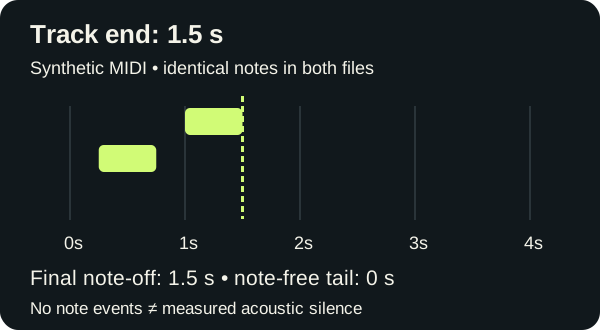
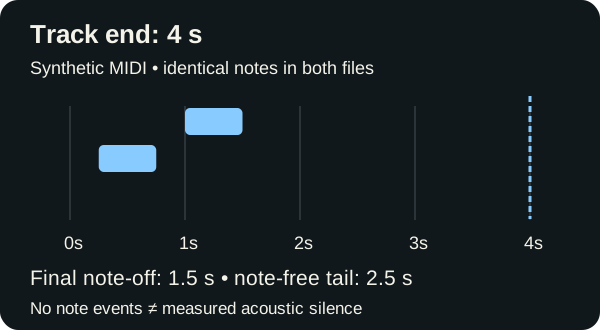
| Measured field | Control A | Control B |
|---|---|---|
| Note count | 2 | 2 |
| Final note-off | 1.5 s / tick 2880 | 1.5 s / tick 2880 |
| End-of-Track | 1.5 s / tick 2880 | 4 s / tick 7680 |
| Note-free tail | 0 s | 2.5 s / 4800 ticks |
| File size | 56 bytes | 57 bytes |
Check the calculation
Both files use 960 ticks per quarter note and a tempo event of 500,000 microseconds per quarter note. That is half a second per quarter note, or 1,920 ticks per second. The final note-off is therefore 2,880 divided by 1,920: 1.5 seconds. In Control B, the track end is 7,680 divided by 1,920: 4 seconds.
Subtracting these event positions gives 4,800 ticks, or 2.5 seconds. This interval changes while both note boundaries stay fixed. We did not slow the music down, stretch a note, add an instrument or insert another note. Only the ending time supplied to this exporter changed.
The raw files are not identical: the End-of-Track delta and track chunk length also change when serialized. The six non-End-of-Track events are identical. Both files remain Format 0 with one track, and the parser found no hanging notes or orphan note-offs.
Download and reproduce the controls
- Control A: 1.5-second track · Control B: 4-second track
- Full event measurements and file hashes
- Generator · Frozen exporter · Independent parser
Save the generator and exporter together and run node generate.cjs. Put the verification script beside the generated files and run it with Python and Mido 1.3.3. Its fixed expected ticks check note pairing, event equality and both track endings. Our self-authored note fixtures and generated MIDI files are CC0; the frozen code retains its project provenance.
Check your MP3-to-MIDI export
- Keep the original MIDI and recording. Inspect a copy before trimming or changing project settings.
- Compare the final note's end with the track or clip ending. If they differ, inspect the saved End-of-Track event as well; an imported clip is not necessarily a byte-for-byte view of the original file.
- If the problem is extra empty time, investigate the ending separately from tempo. Changing tempo or stretching notes can also change the music's timing.
- If the problem is sound that continues after the notes stop, inspect the instrument's release and effects. These two file controls do not measure that sound.
In the source version used here, our converter passes the decoded audio's duration to the exporter. Filtering notes does not itself replace that duration. This code observation explains why fewer notes need not mean a shorter saved timeline; it is not a recording or playback test.
Questions about MIDI tails
Does a longer MIDI file mean extra notes were detected?
Not by itself. Our two files contain exactly the same notes but have different track endings.
Does “no note events” mean audible silence?
No. Instrument release and effects can continue after note-off. We measured file events, not rendered audio.
Will every player preserve the tail?
We have not tested these controls in a player or DAW. Do not treat our parser's event timestamps as a promise about another application's playback or clip display.
Should I change 120 BPM to remove the tail?
Inspect the ending first. Tempo affects the mapping from ticks to time; it is a separate question from extra time after the final note. See the export-clock example.
Method and related checks
Measured October 3, 2026, using the frozen exporter and independent parser linked above. The downloadable controls isolate file structure, not transcription accuracy. See the track and channel controls for a different file-inspection question, or render MIDI as audio when you need to examine actual sound.