MP3 TO MIDI · FILE INSPECTION
Do overlapping notes mean separate instruments?
No. Two notes can overlap inside one MIDI track on one channel. Our current exporter saves notes that way; it does not label them as separate instruments. To check an MP3-to-MIDI result, inspect its tracks and note channels, then compare the parts with the recording.
Three different things to check
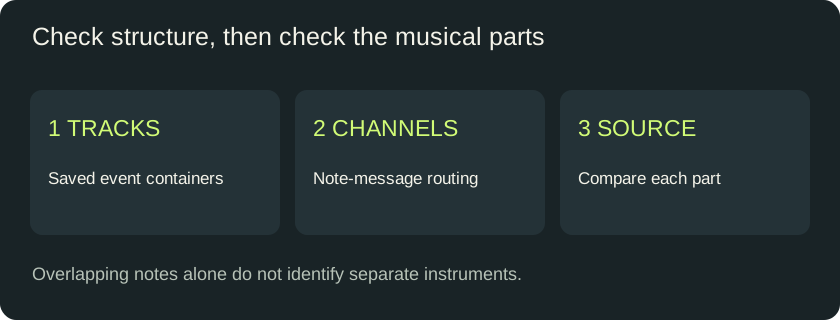
Overlap describes timing: one note starts before another ends. A track is a container for events in the saved file. A channel is a field in a note message that can be used for routing. These are different properties. A piano can play a chord without becoming several instruments, and a file can contain several channels inside one track.
Format 0 means a single track, not necessarily a single channel. Our export uses both a single track and a single note channel. That is a statement about this exporter, not a rule that every Format 0 file contains only one instrument part. The Mido file documentation describes the single-track requirement; the MIDI Association publishes the file specification.
Same exporter, different overlap
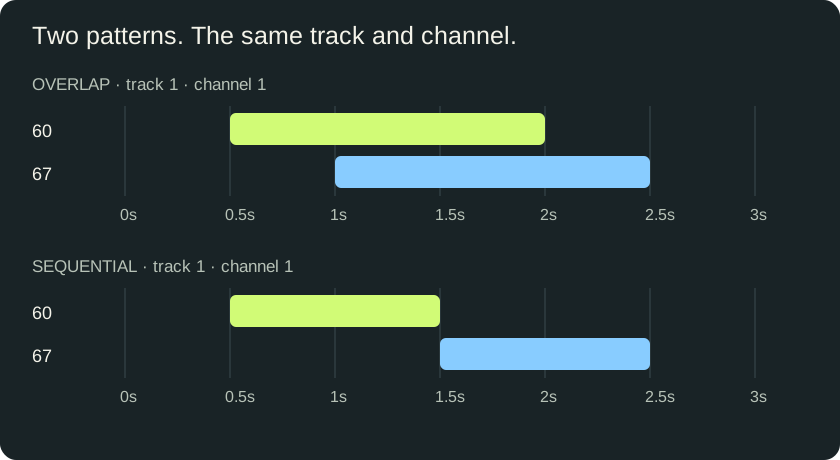
We supplied two sets of known note events directly to the exporter used by this site. Both contain MIDI pitches 60 and 67 at velocity 80 and have a three-second file duration. We bypassed audio detection completely. No MP3, recorded instrument, stem separation model or DAW import was involved.
In the overlap control, pitch 60 runs from 0.5 to 2 seconds, while pitch 67 runs from 1 to 2.5 seconds. Their shared interval is exactly one second: from 1 to 2. In the sequential control, pitch 60 runs from 0.5 to 1.5 seconds and pitch 67 from 1.5 to 2.5 seconds. One ends when the other starts. The two files deliberately differ in note boundaries; they are not a claim about a transcription model hearing the same recording two ways.
| Measured field | Overlap | Sequential |
|---|---|---|
| MIDI format | 0 | 0 |
| Track chunks | 1 | 1 |
| Note channels* | 1 only | 1 only |
| Note-on events | 2 | 2 |
| Maximum active notes | 2 | 1 |
*Channels here use the familiar 1–16 numbering. The raw channel nibble in both files is zero, which is displayed as channel 1. This numbering difference is not a second channel.
What the bytes show
The header in each file declares Format 0 and one track. The parser independently finds one MTrk chunk. Both note-on messages have status byte 0x90; the low nibble assigns both to the same channel. Our parser counts active note events in time order, with note-offs before note-ons at a shared tick. This produces a peak of two active notes in the overlap file and one in the sequential file.
The clock is identical in both files: 960 ticks per quarter note and a 500,000-microsecond tempo event. In the overlap file, note starts occur at ticks 960 and 1920; in the sequential file, they occur at ticks 960 and 2880. These event positions account for the change in overlap without any change in track count or channel assignment.
This is the useful counterexample: overlap changed while track and channel structure stayed fixed. Seeing two bars stacked in a piano roll therefore does not, by itself, establish that a converter identified two source instruments. It also cannot establish transcription accuracy. Those questions require reference audio and a comparison of the actual parts.
Download and reproduce
- Overlapping-note control · Sequential-note control
- Input events, parsed values and SHA256 hashes
- Generator and byte parser · Frozen exporter
Save the generator and exporter together and run node generate.cjs. It recreates both files and the measurement record. The parser is deliberately scoped to events written by this exporter; it is not a general-purpose validator for arbitrary MIDI files. Our original fixtures, code and diagrams are available under CC0.
Check the result you actually downloaded
- Keep the unedited MIDI and original recording. Inspect a copy so that import or cleanup changes do not replace your reference.
- Look at the file's track list and the channels on the note events. Do not infer either from note colors: an editor may color notes by pitch, selection or velocity.
- For a file from this exporter, expect one saved track and note channel 1. If your editor shows more lanes after import, check whether it split or reorganized the events. This page has not tested that behavior in your editor.
- If you need an independently editable bass or melody part, select and verify its notes against the recording. Moving notes to another track creates an arrangement choice; it does not recover their original instrument identity.
For any tool that promises separated instruments, inspect and listen to each proposed part against the source. A label, a track count or several channels shows how a file was organized. None alone proves that the underlying separation is correct. Our two controls let you isolate the simpler file-structure question before evaluating a full recording.
Questions about MP3 to MIDI tracks
Can one MIDI track play a chord?
Yes. Our overlap control contains two simultaneous pitches in one track and on one channel.
Does one track always mean one channel?
No. Those are separate properties. In these particular controls there is one track and one note channel; inspect both fields in other files.
Does changing the instrument sound separate the notes?
Changing the playback sound does not identify which recorded instrument produced each note. Separating parts requires an additional decision about which notes belong together.
Can I split high and low notes into two parts?
You can organize notes by pitch, but that does not prove they belong to different source instruments. Instruments can share pitch ranges. Compare the proposed parts with the recording.
Does this test prove polyphonic MP3 recognition?
No. Known notes went straight to the exporter. We tested how those notes are stored, not whether a model can recover them from audio.
Method and related checks
Measured October 2, 2026, using the frozen exporter linked above. All numbers in the comparison table come from our generated files and parser. For the file's time base, see the 120 BPM control. For a different question, see the short-note filter experiment.