FIELD GUIDE · MIDI CONVERTER
MIDI converter: choose your direction
Have a recording and want editable notes? Use our audio-to-MIDI tool. Already have a MIDI file and want sound? Follow the MIDI-to-WAV guide to an external renderer. This page helps you choose; our site exports MIDI, not WAV or MP3.
Start with what you have and what you need
Audio stores a recording of sound. MIDI stores musical instructions such as note pitches and timing. Estimating notes from a recording and playing existing notes through an instrument are different tasks; changing an extension does neither.
| You have | You want | Where to go |
|---|---|---|
| MP3, WAV, OGG, FLAC or M4A | Editable melody notes in a .mid file | Open our audio-to-MIDI converter. One melody at a time; browser decoding required. |
| A .mid file | A playable WAV recording | Follow our MIDI-to-WAV guide. Rendering takes place in an external tool, not on our homepage. |
| A .mid file | MP3 or another audio delivery format | Use a MIDI renderer with that audio export option. Our rendering workflow explains instrument selection; its documented example exports WAV. |
| An audio file | The same recording in another audio format | Use an audio format converter. Going through MIDI estimates a new set of notes and does not preserve the recording. |
| MIDI tracks, notation, or a hardware connection | Track-format changes, sheet music, or MIDI-to-USB routing | These are separate editing or connection tasks. This site does not provide them. |
What our audio-to-MIDI entry actually supports
The file picker accepts MP3, WAV, OGG, FLAC and M4A; decoding depends on the browser and the file's codec. The tool estimates one pitch at a time, so it does not separate instruments or reliably transcribe chords. It provides note filtering, transpose, a preview and a Standard MIDI File Type 0 download with one track.
The current limits are 50 MiB per file, 10 minutes of audio and a 128 MiB decoded-audio budget. These are software limits, not a guarantee that every device can process the largest allowed file. Selected audio is processed locally. The converter requires no account or payment. Use the WAV workflow for its filter example or the quiet-audio test when a low-level melody produces no notes.
Our test: will a stereo recording become stereo MIDI parts?
For this fixture, no. We made an eight-note melody that alternates between the left and right audio channels, then made an exact mono average of those channels. The two WAV files have different channel layouts. Our converter downloaded identical MIDI bytes for both: the pitch order survived, but the left/right alternation was not encoded.
This is a new test performed on September 27, 2026 at 00:11 Asia/Shanghai (September 26 at 16:11 UTC), using desktop Chromium 152. It is not the older WAV → MIDI → WAV experiment from the rendering guide. We did not run a new reverse conversion because this site has no MIDI-to-audio exporter.
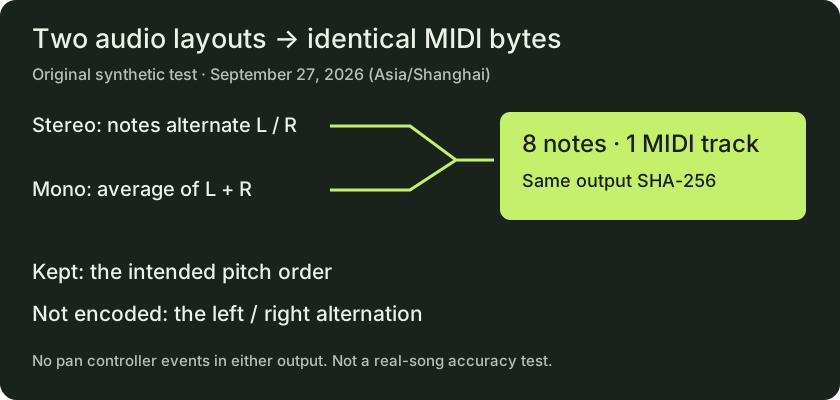
| Check | Alternating stereo input | Mono downmix input |
|---|---|---|
| WAV channels | 2 | 1 |
| WAV duration / sample rate | 3.2 s / 44,100 Hz | 3.2 s / 44,100 Hz |
| Downloaded MIDI notes | 8 | 8 |
| MIDI tracks / used channels | 1 / 1 | 1 / 1 |
| Pan control events (CC10) | 0 | 0 |
| Maximum absolute onset error | 2.6 ms, rounded | 2.6 ms, rounded |
| Output-file comparison | Byte-for-byte identical | |
Both outputs contain pitches 60, 64, 67, 72, 69, 65, 62, 60 in that order. We checked the actual downloaded MIDI with mido, rather than treating the displayed note count as accuracy. Onset error is the largest absolute difference from the generated schedule; no time shift or alignment correction was applied.
The stereo generator puts each isolated tone in just one audio channel. The mono file is exactly (left + right) / 2 at every PCM sample. Each tone's envelope lasts 300 ms, followed by 100 ms of silence; both WAVs use 16-bit PCM. These are generated input settings, verified against file samples and headers. This test contains no overlapping instruments, piano sustain, singing or real songs.
Download the inputs, outputs and reproduction scripts
- Inputs: alternating stereo WAV · exact mono downmix WAV
- Actual outputs: MIDI from stereo · MIDI from mono
- Scripts: generate inputs · run browser conversion · measure saved files
- Commands, dependencies and limitations · measurements · browser results and engine hashes
- Download the complete experiment bundle
The tested pitch-engine.js has SHA-256 prefix 4853e7823aaf…. The version record contains its full hash, plus hashes of app.js, midi-file.js and audio-limits.js; each hash identifies that exact file. The bundle includes the fetched source snapshots. Python 3.12.14 and mido 1.3.3 were used for measurements. The reproduction instructions distinguish rechecking saved outputs from running a fresh browser conversion.
These results apply to this synthetic fixture, engine and browser. They do not establish real-song accuracy or test a physical phone, DAW import, or an external renderer. You may reuse the original fixtures and scripts to repeat the experiment.
Choose what needs to survive the conversion
Need editable pitches? Audio to MIDI gives you estimated notes to inspect. Our test preserved the intended pitch order, with the timing differences shown above. Keep your source recording so you can check your own result.
Need the original sound or stereo placement? Keep the audio and use an audio export workflow. Our stereo and mono sources became the same MIDI file, so that file cannot tell a renderer which of those two source layouts to reconstruct.
Already have the right MIDI notes? Use a renderer and choose its instrument. Sending a rendered recording through our note detector again is a new estimation step. Go directly to the MIDI-to-WAV guide when audio output is your goal.
Before choosing a MIDI converter
Is an MP3-to-MIDI converter the same as a MIDI-to-MP3 converter?
No. The first estimates notes from audio; the second plays MIDI instructions through a sound source and exports audio. Our tool performs the first direction. It does not accept MIDI as a source for MP3 export.
Does a stereo WAV create two MIDI tracks here?
Not in this test: the two-channel input produced one track and one MIDI channel, with no left/right pan events. This site's detector does not assign separate tracks to the input's left and right channels.
Does a piano sound in the preview mean the original piano was recovered?
No. The preview is synthesized playback of detected notes. In our experiment the input is a sine-wave fixture, not a recorded piano; hearing a playback instrument would not change that source.
Can I convert a MIDI file between track formats here?
No. This site's MIDI output is Type 0, but it does not provide an existing-MIDI-to-MIDI format converter. Track editing and format conversion require a MIDI editor with the appropriate export support.
Sources and scope
Capabilities and limits were checked against the live converter and its archived source files. The new experiment supplies its inputs, downloaded outputs and measurements above. The existing MIDI-to-WAV guide remains the source for our separately documented external-rendering workflow.
Search-intent research on September 27, 2026 (Asia/Shanghai) used Google in English with US targeting and personalization disabled. Its footer reported United States from the IP address. Results included audio transcription tools and MIDI-to-audio converters; this is a dated observation, not a ranking guarantee. Read the query method, representative URLs and limitations.