FIELD GUIDE · AUDIO TO MIDI
Audio to MIDI: check a quiet melody before you discard it
Open your recording in the converter and inspect the notes. If a quiet melody returns no MIDI, try the downloadable control below: our quiet file returned no notes at −40 dB, but all eight intended pitches at −60 dB. Keep minimum note length at 40 ms and transpose at zero for this check.
Audio to MIDI online: run this control first
Use these two files to separate a filter problem from a change in the musical phrase. Both contain the sequence 60, 60, 64, 67, 67, 64, 62, 60. The adjacent repeated pitches make it possible to check whether distinct attacks survive as distinct notes.
- Download reference.wav and quiet.wav, then open the converter.
- Choose the reference file. In “Shape the notes,” set quiet-note filter to −40 dB, minimum note length to 40 ms and transpose to zero.
- Replace it with the quiet file, keeping those settings. Record whether the result says “NO NOTES.”
- Change only the quiet-note filter to −60 dB. Compare the returned pitches and note boundaries with the test record below, then download your MIDI.
Changing the filter updates the result without another file upload. These steps reproduce a test of this site's current detector; they are not a recommended preset for every recording.
Our test: two audio levels, three MIDI results
Measured September 26, 2026, 15:58 UTC. We ran the public converter in desktop Chromium 152 on macOS. The tested engine is identified by SHA-256 4853e7823aaf…; the full result record includes complete hashes for the engine, application and MIDI encoder. This is a version-specific observation.
Our generator creates eight sine-wave tones. Each has a 180 ms envelope followed by 60 ms of silence, giving a 1.92 s file. Both inputs are mono, 44,100 Hz, 16-bit PCM WAV. Their amplitude scales before PCM rounding are 0.4 and 0.004: the quiet version has a 100-times smaller amplitude, equivalent to −40 dB by 20 × log10(0.004 / 0.4). This is a generator setting and calculation, not a measured microphone level.
The browser decoded both files to 48,000 Hz in this run. Minimum note length remained 40 ms; transpose remained zero. We changed only the source level or the quiet-note filter between the rows below.
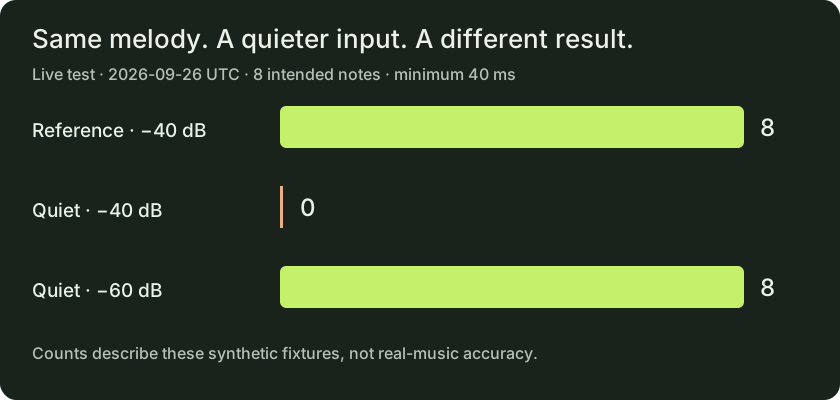
| Input | Quiet filter | Output | Pitch sequence |
|---|---|---|---|
| Reference | −40 dB | 8 notes | 60, 60, 64, 67, 67, 64, 62, 60 |
| Quiet | −40 dB | 0 notes | None; “NO NOTES” |
| Quiet | −60 dB | 8 notes | 60, 60, 64, 67, 67, 64, 62, 60 |
We also parsed the two exported MIDI files instead of relying only on the displayed count. Both contained eight note-on events in the intended pitch order, including separate events for the repeated 60 and 67 pitches. Maximum absolute onset error against our generated schedule was 2.7 ms in each file, rounded to one decimal place. Maximum absolute note-end error was 2.7 ms for the reference output and 7.7 ms for the quiet output. These are measured errors on this synthetic fixture, not estimates for voice or piano.
Matching the pitch sequence did not make the outputs identical: the reference's first note begins at 0 ms in the exported MIDI, while the quiet version's first note begins at 2.6 ms (rounded). The input's programmed onset is 0 ms. No global time shift or alignment correction was applied to these comparisons.
Repeat the experiment yourself
- Download the reference audio · Download the quiet audio
- Download reference MIDI at −40 dB · Download quiet MIDI at −60 dB
- Download the Python audio generator
- Read browser results and version hashes · Read the parsed MIDI event check · Read reproduction and reuse notes
There is no downloadable MIDI for the zero-note row: the converter disabled export for that result. We did not manufacture an empty output file. Our generated samples and recorded outputs may be reused to repeat this experiment.
This test uses synthesized sine tones with silent gaps. It does not test singing, piano sustain, room noise, overlapping notes, phone microphones or DAW import. A different browser or engine version may produce different boundaries.
Use the quiet-file result to choose your next check
Quiet file is empty, reference works: compare −40 dB with −60 dB before changing the recording. In our run, that single filter change restored the quiet file's eight intended pitches. This diagnoses this fixture; it does not establish that every empty result is a level problem.
Both files return eight notes: check the sequence, not just the count. Our reference includes two consecutive 60s and two consecutive 67s; a merged repeat plus an unrelated extra event could still add up to eight.
Pitches match but timing differs: inspect note ends as well as starts. Our two successful results share the same maximum onset error but differ in maximum note-end error. The downloadable event check keeps those measurements separate.
Your result differs from this page: keep the input and settings fixed, then compare the current engine file with the archived hash. Do not force your recording to match these numbers; they belong to the supplied test files and stated version.
Questions from related audio-to-MIDI searches
Audio to MIDI free: can I repeat the complete test without an account?
We completed the file selection, filter changes and MIDI generation above without registering or paying. Both source WAVs, both successful MIDI outputs and the generator are downloadable here. The zero-note run has its recorded status instead of an invented MIDI download.
Audio to MIDI piano: does this eight-note result validate piano transcription?
No. The generator uses sine waves and silent gaps; it contains no sampled piano or sustain pedal. In particular, the separate repeated 60 and 67 events only validate these programmed attacks. They say nothing about repeated piano notes under sustain.
Audio to MIDI AI: was this result produced by Spotify Basic Pitch?
No. This experiment ran this site's local pitch engine, identified in the result record, rather than Spotify's model. No competing converter was run on these files, so this page makes no comparative accuracy claim.
Audio to MIDI VST: can I use these files to check a plugin?
You can reuse the generated WAVs and compare its exported note events against the same sequence and schedule. The measurements here are from our browser converter only. Plugin results and DAW import behavior have not been measured in this experiment.
Method and sources
The input generator, browser observations, exported MIDI checks and diagram are original work for this page. Numerical statements above come from the downloadable records or explicitly identified generator settings and arithmetic.
The headings “audio to MIDI online,” “audio to MIDI free,” “audio to MIDI piano,” “audio to MIDI AI” and “audio to MIDI VST” were observed in Google's “People also search for” section in an English, US-targeted Google search on September 26, 2026 (UTC). These are first-party related-search observations, not verified search-volume estimates. See the source URLs and research record.